
(X)HTML & Dreamweaver (Forms, Special Characters, etc) (L029)
Forms
Forms are the elements that allows the user to interact with the site.
A form has tags and elements which enable diverse input options.
These elements are controls. They are similar to controls in any development environment.
So here is the rub... You really can't use the full power of forms unless you use a server-side script or at least some Javascript... You need a way to parse the get/post method parameters.
Use them for your design, but we will not cover them in detail until we start using scripts.
The Open Form tag
<form action="http://www.somewhere.com/somepage.asp" method="post/get">
Text Field
<input type="text" name="lastname" value="Nixon" size="30" maxlength="50" />
Hidden Field
<input type="hidden" />
Text Area
<textarea name="Comment" rows="60" cols="20"></textarea>
Checkbox
<input type="checkbox" checked="checked" />
Radio Button
<input type="radio" checked="checked" />
List/Menu
<select>
<option>Apples</option>
<option selected>Bananas</option>
<option>Cherries</option>
</select>
<input type="password" />
<input type="submit" value="Submit" />
<input type="reset" />
The Close Form tag
</form>
Forms will be covered again in more detail when we start Server Side scripting.
Escape Sequences
(a.k.a. Character Entities)
Character entities have two functions:
Three ASCII characters--the left angle bracket (<), the right angle bracket (>), and the ampersand (&)--have special meanings in HTML and therefore cannot be used "as is" in text. (The angle brackets are used to indicate the beginning and end of HTML tags, and the ampersand is used to indicate the beginning of an escape sequence.) Double quote marks may be used as-is but a character entity may also be used (").
To use one of the three characters in an HTML document, you must enter its escape sequence instead:
< the escape sequence for <
> the escape sequence for >
& the escape sequence for &
Additional escape sequences support accented characters, such as:
ö a lowercase o with an umlaut: ö
ñ a lowercase n with a tilde: ñ
È an uppercase E with a grave accent: È
You can substitute other letters for the o, n, and E shown above. Visit the World Wide Web Consortium for a complete list of special characters.
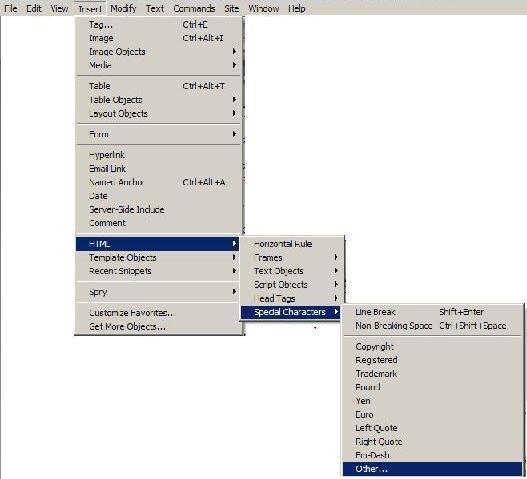
Dreamweaver makes it very easy to add special characters...
Insert, HTML,Special Characters, Other...
NOTE: The escape sequences are case sensitive. You cannot, for instance, use < instead of <.
Other Elements
<!-- This is a comment -->